Supplied from China
ACMELEC manufactures and supplies HVAC controls from Nanjing, China, for distributors, installers and OEM/ODM projects.
WiFi and Zigbee share the same dimensions, weight and package contents within each model.
BUY ACMELINK
AcmeLink is ACMELEC’s HVAC gateway series. ACMELEC is the main brand; ME, DK, B19, B27 and B25L identify gateway routes and ordered configurations.
Mitsubishi Electric · CN105
Standard versions · single-unit purchase
Sales by Acmelec (Hong Kong)Limited
↓ Installation & product detailsThe purchasing terms below apply to wholesale and custom projects. The WiFi and Zigbee standard versions above are available individually; other configurations require an inquiry.
AcmeLink (VRF Gateway)
Smart control module for compatible Mitsubishi Electric indoor units with a CN105 port. Choose WiFi, Zigbee, Modbus, WiFi + Modbus or Zigbee + Modbus. The compatible CN105 interface supplies power and communication; Modbus configurations add RS485 A/B wires.
Factory supply · B2B
ACMELEC manufactures and supplies HVAC controls from Nanjing, China, for distributors, installers and OEM/ODM projects.
Models, protocols and software versions may be counted separately. Pricing and production lead time depend on the confirmed configuration and quantity.
After requirements and payment are confirmed: stock samples approximately 3 working days; functional/protocol configuration 15–20 working days; logo, manual or packaging adjustments approximately 10 working days.
Send the complete indoor-unit model, communication connector or wiring photos, required protocol and control functions. Compatibility depends on the exact unit and ordered configuration.
Available ME configurations are WiFi, Zigbee, Modbus, WiFi + Modbus and Zigbee + Modbus. WiFi + Zigbee and WiFi + Zigbee + Modbus are not supported.
| Configuration | Control route to prepare | Additional RS485 wiring |
|---|---|---|
| WiFi | 2.4 GHz WiFi; Tuya Smart / Smart Life | None |
| Zigbee | Tuya Zigbee; confirm the gateway and pairing arrangement | None |
| Modbus | RS485 host or BMS; request the matching register map | A/B |
| WiFi + Modbus | 2.4 GHz WiFi; Tuya Smart / Smart Life | A/B |
| Zigbee + Modbus | Tuya Zigbee; confirm the gateway and pairing arrangement | A/B |
WiFi and Zigbee versions use the same wiring but different Tuya modules. Modbus configurations add two RS485 communication wires, A and B, to the indoor-unit connection. Specify the required configuration before ordering; these options do not mean one supplied unit includes every protocol or can switch between WiFi and Zigbee through a software setting.
For Modbus integration, request the register map and serial communication settings for the ordered configuration. Confirm compatibility with the intended controller or BMS. For a Zigbee order, confirm the required Tuya gateway and pairing arrangement before installation.
Selection and installation reference
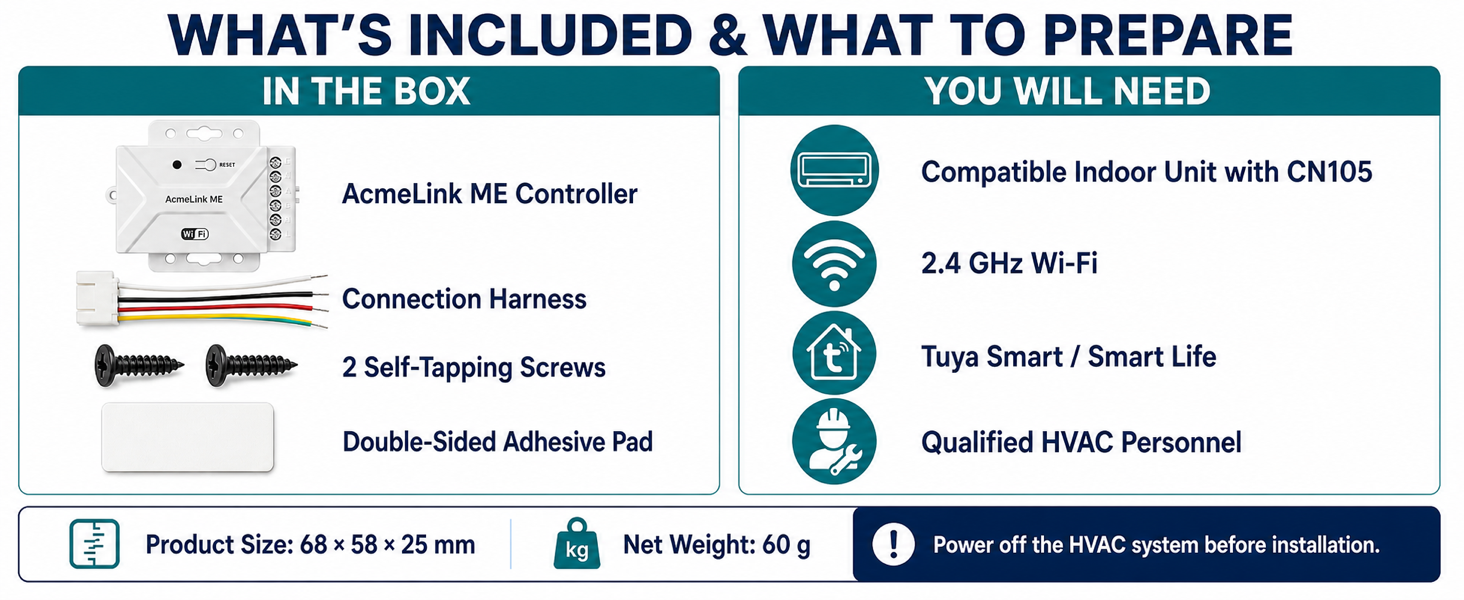
The illustrated standard WiFi package contains an AcmeLink ME controller, connection harness, two self-tapping screws and a double-sided adhesive pad. The product body is 68 × 58 × 25 mm and its net weight is 60 g. Confirm the packing list for the configuration you order.
ME is available as WiFi, Zigbee, Modbus, WiFi + Modbus or Zigbee + Modbus. WiFi + Zigbee and the three-protocol combination are not supported. Compare all five ME configurations and their wiring.
The compatible CN105 connection provides communication and power; no separate power adapter is required for the ME module. The WiFi illustrations do not mean WiFi is included in a Zigbee-only or Modbus-only order.
References: supplied package and preparation panel · ME manual · WiFi setup guide. Protocol combinations and A/B wiring reflect the manufacturer's configuration clarification.
Complete product presentation
The illustrated presentation below shows the WiFi configuration. Review its working principle, compatible indoor units, app functions and installation process; confirm documentation for the Zigbee or Modbus configuration you order.


AcmeLink gateway detail
AcmeLink ME is used for Mitsubishi Electric air conditioner smart control projects where the buyer wants a compact gateway module instead of changing the visible wall thermostat style.
| Target brand | Mitsubishi Electric |
|---|---|
| Physical connection | CN105 port on compatible indoor units |
| Power | Powered through CN105; no separate wall adapter |
| Wireless option | 2.4 GHz WiFi or Zigbee by configuration; none on Modbus-only units |
| App | Tuya Smart / Smart Life for the appropriate wireless configuration; confirm the Zigbee gateway requirement |
| Control functions | Power, mode, temperature, fan speed, schedules and status synchronization |
| Dimensions | 68 x 58 x 25 mm |
| Net weight | 60 g |
| Installation focus | Confirm the complete indoor-unit suffix and CN105 connector before ordering |
P20, 25, 32, 40, 50, 63, 71, 80, 100, 125 and 140 with the VMA(L)-(E) suffix shown in the manufacturer-tested model list.
P18, 24, 30, 36, 42, 45 and 48 JAG, plus P60 GAG.
M25, 35, 50, 60 and 71 with the DA(L) suffix shown in the manufacturer-tested model list.
Verify the complete model suffix and CN105 connector. Send the model label or connector photo if unsure.
Installation and control demo
This short demonstration shows the direct CN105 connection, communication indicator, Tuya mobile app control and supported smart-speaker control.
AcmeLink ME uses the compatible indoor unit's CN105 interface for both communication and power, so no separate power adapter is required.
Professional detail
AcmeLink ME is a Mitsubishi Electric VRF smart gateway module for projects that need app-based or smart platform control without replacing the complete air conditioner control route.
Hidden add-on gateway for Mitsubishi Electric indoor units equipped with CN105.
Selected PEFY, PEY and SEZ models; verify the full suffix and connector before ordering.
Choose WiFi, Zigbee, Modbus, WiFi + Modbus or Zigbee + Modbus. Functions and integration requirements depend on the ordered configuration.
Send the complete indoor-unit model label or a clear CN105 connector photo for confirmation.
Compatibility across markets
For an AcmeLink ME project in any country, start with the complete indoor-unit model, including its suffix, and a clear photo of the CN105 connector. ACMELEC confirms completed compatibility testing for the listed PEFY, PEY and SEZ models across all five configurations: WiFi, Zigbee, Modbus, WiFi + Modbus and Zigbee + Modbus. This manufacturer-confirmed scope applies to the listed models and suffixes; a series name or a connector alone does not establish compatibility for other models.
Include the original controller model, any existing adapter connected to the indoor unit, and the functions you need to retain. Ask ACMELEC to confirm the connection arrangement before ordering a sample. For a different model or an uncertain suffix, request a compatibility review rather than assuming it matches a similar-looking unit.
For wireless orders, also specify the destination country, intended Tuya app and any required smart-home platform. Confirm the exact configuration, gateway requirements and applicable product documents for that market before bulk purchasing.
Request an AcmeLink ME compatibility reviewApplication details
To speed up quotation, include HVAC brand/model, protocol requirement, order quantity, target market, logo needs and certification requirements.
Open English manualFunction details
AcmeLink ME adds app control while remaining hidden beside the indoor-unit control board.
One plug carries power and communication; no separate wall adapter is required.
Control power, operating mode, target temperature and fan speed through Tuya Smart or Smart Life.
Create schedules and synchronize supported operating status with the app.
Works with supported Tuya integrations such as Alexa, Google Assistant, SmartThings and Yandex.
Technical checklist
Exact configuration depends on project requirement, so ACMELEC confirms the real HVAC system before quotation and sample preparation.
Specification summary
| Model | AcmeLink ME |
|---|---|
| Product family | AcmeLink HVAC Gateway |
| Connection | Mitsubishi Electric CN105 |
| Wireless option | 2.4 GHz WiFi or Zigbee by configuration; none on Modbus-only units |
| Compatible system | Selected Mitsubishi Electric PEFY, PEY and SEZ indoor units |
| App | Tuya Smart / Smart Life for the appropriate wireless configuration; confirm the Zigbee gateway requirement |
| Voice support | Alexa, Google Assistant, SmartThings and Yandex where supported by Tuya |
| Power | From compatible CN105 interface |
| Dimensions | 68 x 58 x 25 mm |
| Net weight | 60 g |
| OEM/ODM | Logo, label, packaging and manual support by project |
Verified product answers
It plugs into the CN105 port on a compatible Mitsubishi Electric indoor-unit control board.
No. A compatible CN105 interface supplies both power and communication.
Confirm the complete indoor-unit model suffix and the CN105 connector. Send the model label or control-board photo if uncertain.
Explore the range
Samples, MOQ and lead time
Public customer feedback
An Alibaba buyer reported that the adapter worked with their Mitsubishi air conditioner through CN105 and that the instructions were clear.
Source: buyer M***g, platform location Singapore, . Read the public Alibaba product review.
This is an individual buyer report for the linked WiFi-adapter listing, not an independent compatibility test. The review does not provide the complete indoor-unit model or ordered hardware revision, and does not establish Zigbee, Modbus or combined-configuration performance. Confirm the current configuration and exact HVAC model before ordering.
In a separate review dated 29 March 2026, a buyer with the same displayed name reported normal operation and suggested adding hook-and-loop tape for mounting beside the wall unit. These records are not presented as two independent customer projects. Customer photos are not reproduced here.
Manual, video and setup guides
The revised English manual includes both wireless setup routes. Select the instructions for your ordered configuration. The installation video demonstrates CN105 connection and smart control; use the written setup steps for pairing.
Manual revised 14 September 2026 · 16 pages · approximately 23 MB. Specifications: 68 × 58 × 25 mm, net weight 60 g. Pairing mode: green indicator flashing.
For WiFi and WiFi + Modbus configurations. The Bluetooth function described below assists WiFi device discovery; it does not mean Bluetooth is an additional orderable control configuration.
Open manual pages 6-11. App wording may vary by version. If the device is not discovered, check the flashing green indicator, WiFi band, password and phone Bluetooth setting before trying again.
For Zigbee and Zigbee + Modbus configurations. First add the appropriate Tuya Zigbee gateway to the app; then add AcmeLink ME as its sub-device. Confirm the gateway model for your project.
Open manual pages 12-16. Generic reset examples in the app may describe other devices; use the green flashing ME pairing indication stated here.
The wireless setup chapters cover the WiFi or Zigbee part of a combined version. Request the matching RS485 A/B wiring, register map and serial settings for Modbus integration.
Ask about setup or Modbus documentationInstaller and integrator checklist
Use the confirmed indoor-unit model and ordered protocol configuration for the sample test. Record the results below for each installation type; these are project acceptance checks, not a claim that every function is available on every indoor unit.
If a check fails, send the complete model, ME configuration, wiring photos, indicator state and a description of the command and observed response. Request the documentation for the exact configuration; WiFi setup steps do not replace a Modbus register map.
Download the English ME manual · Read the Mitsubishi Electric Tuya WiFi setup guide
International B2B projects
Installers, HVAC distributors and system integrators can use the same model-checking process across markets. Provide the project details below so the configuration and sample requirements can be reviewed before a quotation.
Use the English product information for general selection and request configuration-specific documents for the intended installation. Price and supply terms are confirmed through B2B quotation.
For Modbus versions, request the register map and serial settings. For Zigbee versions, confirm the gateway and pairing requirements. Certification documentation is confirmed by model and market.
Compare the AcmeLink ME CN105 Matter AC controller for compatible Mitsubishi Electric indoor units. The current Matter edition provides Cool / Heat, temperature setpoint adjustment and Auto fan only; additional controls remain in the original app. Confirm the exact equipment model, firmware and required functions before selecting a version.
Review the video index, compatibility source records and support checklist. Demonstrations, manufacturer declarations, manual connection references and customer reports have different evidence limits. Request the complete indoor-unit match and delivered firmware before ordering.